
- The certificate attached and previewed on the company
- Your own ADISA certification, and a DIAL level per warehouse
- "From the driver" on the Standard Screen too
- Signing at the warehouse for drop-offs and returning loads
- A new Booking In guide on the Knowledgebase
- Copy the vehicle and crew from the previous run
- The driver confirms the depot between runs in Driver Hub
RecyclyERP 2026.18 brings ADISA DIAL Ratings into every step of a job: record and verify each customer's DIAL rating once, and see it on the order, the contract, the collection, the driver's phone and at Booking In. Alongside it come three named Booking In screens with scan boxes and a "From the driver" panel, more than one run per driver per day on the Route Planning board, and drivers scanning barcodes on summary jobs. There is also a redesigned Welcome Panel, a Setup Assistant you can open from the top-right menu, and grading that copes with manual and calculated grades side by side.
This release focuses on ADISA DIAL Ratings, Booking In, Route Planning & Driver Hub, the Welcome Panel & Setup Assistant, Grading, Inbound Orders & Collections, Outbound Orders & Deliveries, Document Templates, Hardware Auditing, the Customer Portal, Users & Settings and the Knowledgebase - with new features added to your Setup Assistant so you don't miss them.
Release Highlights
- ADISA DIAL Ratings: Record and verify each customer's DIAL rating on their company and sites, with the certificate attached, and see it carried onto every inbound order and collection, onto the driver's phone and into Booking In, alongside your own ADISA certification and a DIAL level for each warehouse.
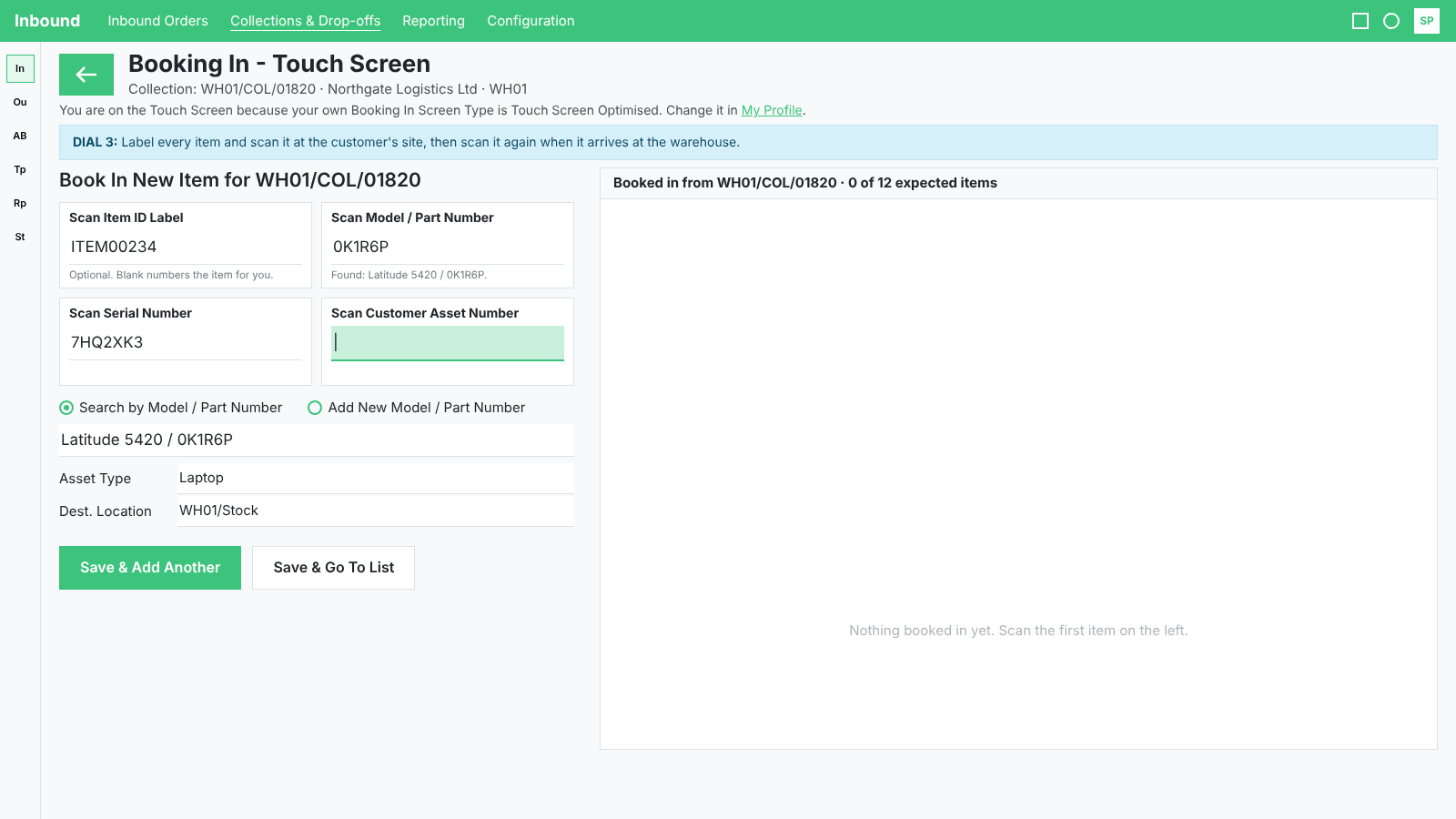
- Booking In, named and scannable: Each of the three Booking In screens now has its own name and says why you got it, the Standard Screen gains a scan box for the Item ID Label, the Touch Screen gains four for the Item ID Label, Model, Serial Number and Customer Asset Number, and the Standard Screen shows what the driver counted at the collection.
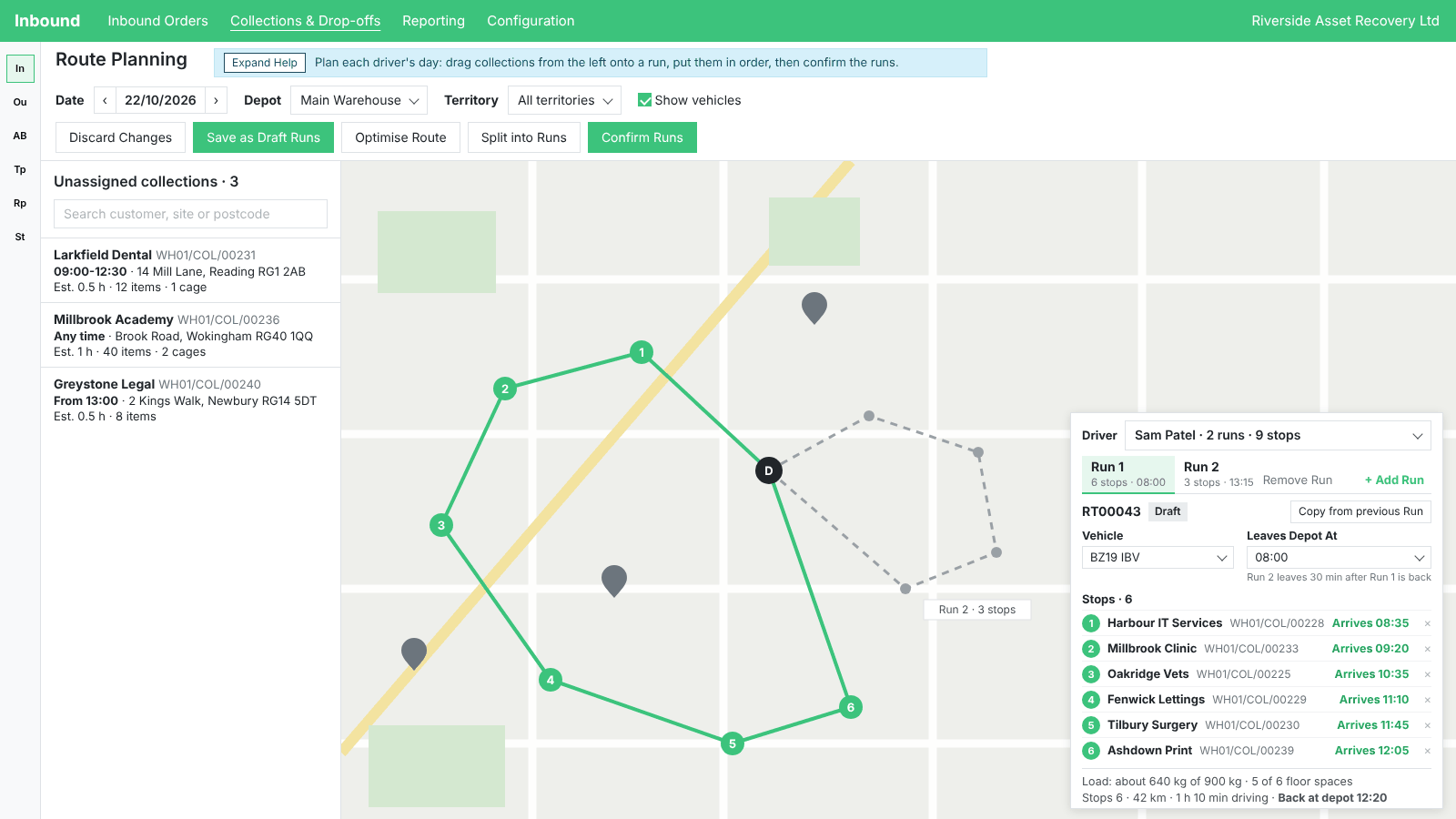
- More than one run per driver per day: Plan a driver's morning and afternoon as separate runs on the Route Planning board, split a long day into runs with a preview of the split before anything changes, and let the driver confirm their return to the depot between runs in Driver Hub.
- Drivers scan on summary jobs: Driver Hub now scans barcodes and QR codes on jobs whose items are only a summary, such as "Laptop 20", several at once from a bigger camera view, and the office sees what was scanned on the collection and in Book Items In.
- Welcome Panel and Setup Assistant: A Welcome Panel that fills 80% of the screen with every feature on show, a Setup Assistant you can open from the top-right menu with a colour-coded status and a done count on every area, and Setup Assistant access set per user.
- Grading, manual and calculated together: Set the Final Item Grade from the Manual Grade for a whole selection of items at once, generate a Starter Scheme for Grading Schemes, and let SKU matching fall back to the Manual Grade when no Final Item Grade is set.
And that is just the start. Read on for everything in 2026.18.
ADISA DIAL Ratings
ADISA's DIAL rating says how sensitive a customer's data is, and therefore how their equipment must be handled. RecyclyERP 2026.18 lets you record it once and follow it all the way through a job.
- Switch ADISA DIAL Ratings on under Settings > Inbound, see ADISA's DIAL Levels and what each one means under Inbound > Configuration > Contracts, and record your own ADISA certification on Company Settings under Registrations & Certifications, with a Set Our ADISA Certification shortcut from Settings.
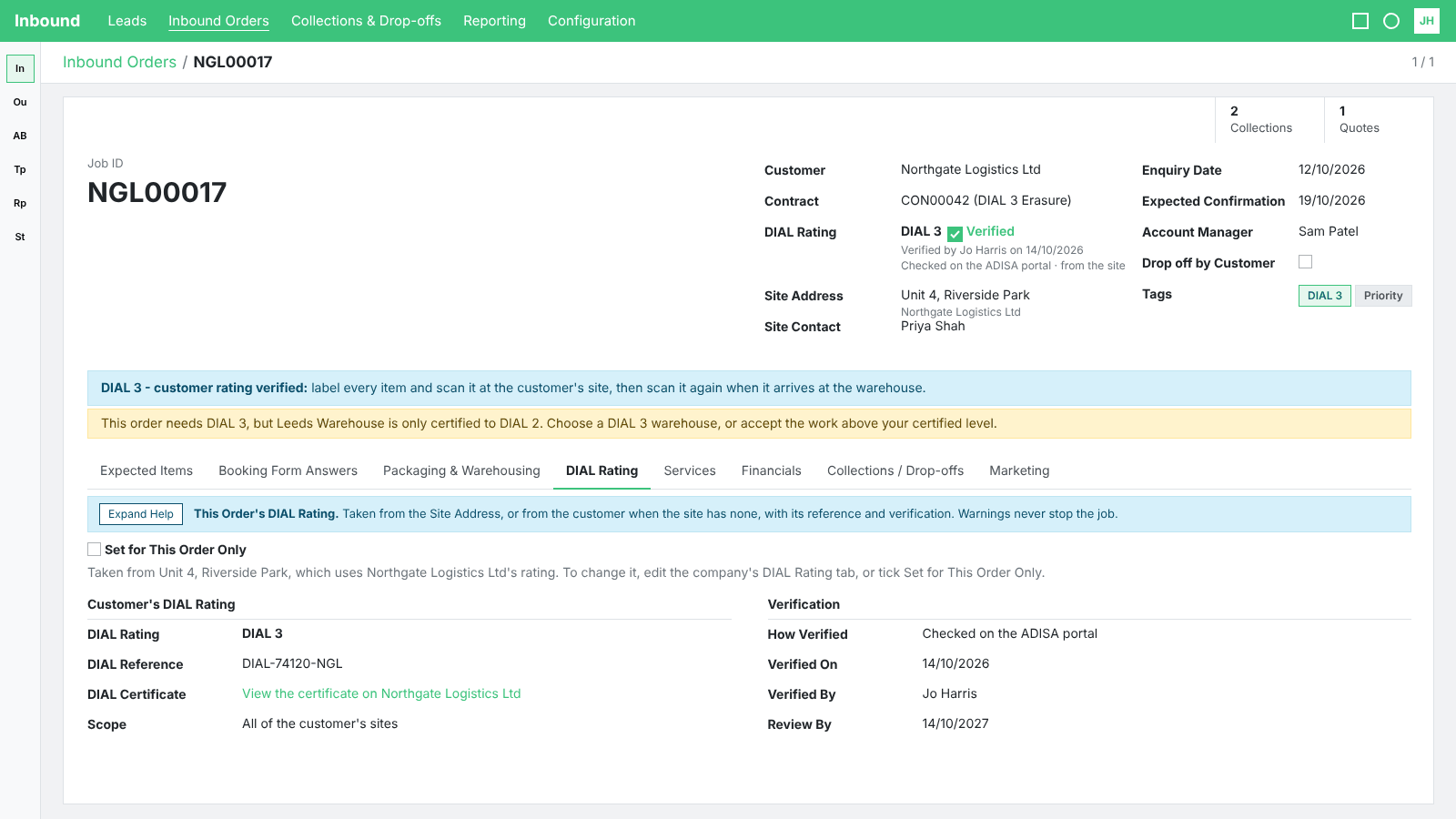
- A new DIAL Rating tab on every company and site in the Address Book: record the customer's rating and reference, attach their certificate and preview it without downloading, and mark it verified; every change is written to the Log Note, and the rating shows on the Companies & Contacts list and on each company's Sites tab.
- Every inbound order carries the customer's DIAL rating, or one set for this order only, with a blue panel carrying the handling instructions for that level and a yellow warning when something needs attention, which never blocks the order; the order follows later changes to the customer's rating until it is finished, and the Inbound Orders list, cards and search show it.
- Contracts and Contract Templates say which DIAL level they are designed for, and the rating is shown on each collection, on the Collections list, cards and the Route Planning board, on the driver's collection in Driver Hub, and at Booking In when the goods arrive at the warehouse.
- Each warehouse carries its own DIAL level, shown by default on the Warehouses list with a Group By option, and searching "ADISA" on the main menu finds the DIAL Levels.
- Your customers see their rating on the Customer Portal's Site Access Details page and on the booking form when they are signed in.
- New Commonly Used Fields for DIAL ratings on Document Templates, and the shipped Data Erasure Certificate, Data Destruction Certificate and Inventory Report templates now carry a DIAL Rating line.
- A new Setup Assistant action under Services & Contracts Configuration, and a new Knowledgebase guide: ADISA DIAL Ratings: your customers' ratings and your own certification.
Booking In
- Each of the three Booking In screens now has one name everywhere - Standard Screen, Standard Screen: Expected Items, and Touch Screen - and a line under the title saying why you got that screen.
- Hovering a Book In button says which screen will open, the Booking In Screen Type setting has one name and shows the company's choice, and a new Setup Assistant action, Choose your Booking In screen, helps you pick.
- Scan boxes on the Standard Screen (Scan Item ID Label) and on the Touch Screen (Scan Item ID Label, Scan Model / Part Number, which finds the model, Scan Serial Number and Scan Customer Asset Number), with a tidier Touch Screen title and top bar and a Standard Screen breadcrumb that stays short.
- A "From the driver" panel on the Standard Screen and on the Scan Incoming Expected Items pop-up, matching the Touch Screen, so the warehouse sees what the driver counted at the collection, with a line going amber where it differs from what was expected.
- Discard Scanned Items & Lots only asks for confirmation when something has been scanned, and the help panels on all three screens say the same as the screens do.
- Enhancements to signing at the warehouse: the warehouse can now sign for a load Received at the Depot when a collection comes back, a Drop-off Signatures tab keeps every signing as evidence, and the Waste Transfer Note, Duty of Care Document and Driver Hub Signatures templates are updated to match. The pop-up behind the Received Into Stock button says plainly what it does, and a progress message shows while a document is being generated.
- Scan Incoming Expected Items now confirms an unexpected item without stopping.
- Faster item saves and Booking In on large systems, released early as a hotfix on 8 October: saves and book-ins on very large systems complete in seconds.
- A new Knowledgebase guide, Booking In: the three Booking In screens, scanning and "From the driver", linked from the Read the guide link on each screen's help panel, with a Signing at the warehouse section.
Route Planning
- More than one run per driver per day: the route pane on the Route Planning board shows a tab per run, a new Split into Runs pop-up previews how a long day divides into runs before anything changes, and Copy from previous Run fills in the vehicle and crew; Optimise Route, the Load line and the totals work per run, and the Driver Run Sheet, the Routes list and the route form show each run.
- Run start times are set under Settings > Inbound > Route Planning & Maps and on the board's Leaves Depot At, and a new Unloading Time Between Runs setting allows for the time back at the depot.
- Enhancements to the Route Planning board: every collection card shows its collection code and can be opened in a new tab, a "Cannot be mapped" pill opens Check Site Address, and the map re-zooms to show the whole route whenever it changes. The filters and buttons can be pinned above the board, and a Discard Changes button appears as soon as there is something to discard.
- Hovering a map pin shows the postcode and the distance from the previous stop, and the "Possible double booking" warning now says what the person is doing on the other collection and whether it is on a route.
- Arrival times on a route always run in order, even when a driver finishes a stop out of route order.
- A new column on the Collections list showing each collection's route status, such as Needs Rebooking, Routes cards grouped by date in date order, new pivot and chart views on Routes, a distance-from-previous-stop column on a route's stops, and the Routes menu offered on a phone in place of the board.
- When your maps account is out of credit or over its limits, Settings > Inbound > Route Planning & Maps now says so plainly.
Driver Hub
- Scan barcodes and QR codes on jobs whose items are only a summary, such as "Laptop 20", with a Scan button on each Asset Type line; what was scanned shows under Scanned by the Driver on the collection's Proof of Collection tab and on a new tab in Book Items In. It is on by default; switch it off under Settings > Inbound > Driver Hub, Drivers can scan items on summary jobs.
- Scanning now reads several barcodes at once from a much bigger camera view, flashes when a code is recognised, beeps or vibrates when a scan is removed, and colour-codes each line; the Scanning items in Driver Hub setting makes scanning optional, required or off.
- Each driver chooses Small, Medium or Large text under a new Settings screen, applied on every screen including the guides, the install guide, the sign-in and the lock screen, and the default text is bigger than before.
- The green top panel stays pinned while scrolling My collections, with a slim summary line that still works when scrolled down, on phone, tablet and desktop.
- Each collection card shows where it comes in the day's run (1, 2, 3 and so on) in large type, a collected collection opens to its full details, and a driver can step back to a previous step while processing a collection where it is safe to do so.
- Small things that matter on a phone: Driver Hub says what it is loading or sending, zooms back out after typing in a box, shows clearer notes under the expected items and an amber warning when hazardous waste has no consignment code, and carries the office phone number. The guides show at one and a half times the size, and the Sending screen shows the last 24 hours of what the phone has sent and received.
- Tapping Sharing Location asks before it stops sharing, the install instructions cover Chrome on iPhone and Android as well as Safari, and a new About screen shows who is signed in, where the app connects and its signal.
- When a new version of Driver Hub is ready, it now waits until the driver has finished any collection in progress before updating.
- Arrived at Depot now works between runs as well as at the end of the day, so the first run's load is handed to Booking In before the driver heads out again, and a banner above each run shows the run number.
Welcome Panel & Setup Assistant
- The Welcome Panel on login now fills 80% of the screen with every feature shown as a grid, or a sliding strip on a phone, with a close cross and a Visit Website link, and its text scales when the browser is zoomed. It never appears for someone who has switched it off, and it shows even when your start screen is not the main menu.
- Open the Setup Assistant from the top-right user menu, see a colour-coded status on each setup action, and a "(X of Y done)" count on every area heading.
- Setup Assistant access is now a tick box on each staff user and a column on the Users list, the Setup Actions screen is tidied, and the help panel says the order of the actions is a suggestion rather than a fixed sequence.
- New Setup Assistant actions for your Booking In screen and ADISA DIAL Ratings, so nothing in this release is missed, plus actions for vehicle capacities, your Asset Types' typical weights and the EWC Code on your Asset Types.
Grading
- Set Final Grade from Manual Grade: select items on the Items & Lots list and copy each one's hand-entered Manual Grade into its Final Item Grade in one action, after a pop-up showing what will change and listing any item whose Final Item Grade already differs.
- A Starter Scheme generator on Grading Schemes creates a scheme with one score band per active item grade, so a new system has a working scheme to start from.
- SKU matching uses an item's Final Item Grade when set and falls back to its Manual Grade when blank, in both directions.
- Component grading: an item created without any attributes, such as a component from a Demanufacture, is never graded automatically, editing an attribute on an item recalculates its grade, and a component is always graded from its own attributes rather than inheriting the parent's grade.
Inbound Orders & Collections
- Items broken down for parts still count as received: An item or lot fully broken down with Demanufacture / Parts Harvest now still counts as received when you quote, order or invoice a job on scanned items, and it still appears in the actual waste figures by EWC (European Waste Catalogue) code on your waste documents. Until now it dropped out of both once it was broken down. One thing you may notice: a charge that applies to every item on a job now counts a broken-down item once, as it arrived, instead of counting each part and material it was broken down into.
- Collection and drop-off form tidy-ups: the Source, Inbound Order and Customer are read-only on an inbound-order collection, the Operation Type field is hidden, and a customer drop-off's date is labelled Expected Date.
- Renames and setting changes on Warehouses and Locations are now logged in the Log Note, and both can be archived and restored.
Outbound Orders & Deliveries
- Enhancements to Product Availability on deliveries: it reads Available only when the specific Items & Lots on it are available, on the delivery and in the Deliveries list.
- Enhancements to the wording on Outbound Orders and Deliveries: the Dispatch Reserved Items pop-up, the help panels on the Deliveries list, the delivery and its Items Summary tab, and the Qty Expected column and its tooltip on every transfer, with the two Knowledgebase guides updated to match. The button on a draft order now reads Confirm Order & Create Delivery, and Qty Expected is locked on a cancelled row.
Document Templates
- Enhancements to document generation: a brief hiccup from the PDF conversion service is retried within a 60-second limit, and the messages people see say what happened.
- Enhancements to Document Templates access: an ordinary user without website editing rights can open every template, including those with a Fixed RecyclyERP layout.
- The Document Templates system area Sales Orders is renamed Quotations / Sales Orders everywhere it appears.
Hardware Auditing
- Blancco and Certus Erasure reports now show the right Report Date in UK summer time (Blancco reports were an hour late and Certus reports an hour early); existing reports are corrected on upgrade, and the date at the start of a report's name is now your own day.
- The Hardware Audit Report form gains a green Create Recycly Item from Report button while the report is still to be processed, and a Refresh Details from Source Data button for Settings administrators.
- Enhancements to audit report processing: the Download & Process job now works within a time budget and saves its progress report by report, so a long queue keeps moving rather than starting again, and reports more than 90 days old wait for you to match by hand rather than being matched automatically.
Customer Portal & Booking Form
- The Customer Portal home page now draws as soon as the quick parts have loaded and counts the customer's sites in the background, and the Simulate a portal user list loads the same way.
- The collection tracking page your customers share now refreshes itself every 30 seconds, the Share tracking link is offered only until the collection has been made, and a new Customer tracking links setting under Settings > Inbound > Driver Hub, on by default, lets you switch the links off.
- Your Book a Collection form now makes clear which required fields are missing and scrolls the message into view.
Users & Settings
- Users can set their own Default Country from My Profile > Preferences, instead of asking an administrator, and the My Profile and User Details Preferences tabs are tidier.
- The Users list gains a Last Activity column showing roughly when each user was last on the system, Latest authentication is renamed Latest Login, and a new column beside it shows that login in the user's own time zone rather than yours.
- Calendar views, for example Collections, keep the view type and date range you chose after you open an event and go back.
- When RecyclyERP is opened in a new browser tab, the tab icon is RecyclyERP's own straight away, on the sign-in page, the Customer Portal and the website too.
- Each colour box under Settings > Backend Theme now explains what it paints and what Recycly's own colour is, and the reset button returns to Recycly's green.
Knowledgebase
- Two new guides: ADISA DIAL Ratings: your customers' ratings and your own certification and Booking In: the three Booking In screens, scanning and "From the driver", each linked from the help panels of the screens they describe.
- Five guides are brought up to date: delivering an order and confirming dispatch, how sales orders and delivery orders interact, direct printing through PrintNode, importing data step by step, and part-shipping orders; and the Returns (RMAs) guide on the customer pack, the RMA document and return labels is corrected.
General & Platform-wide Improvements
- Screens open at the top of the page: a job's Items & Lots and Request a Return on the Customer Portal, an item opened from a scrolled Store page, the Touch Screen Booking In and a Driver Hub collection marked Could Not Collect; the browser's Back button on the Customer Portal returns where it should.
- Enhancements to the main menu: Dashboards and the Address Book keep their places after every update, the Address Book opens as a list, and Link Tracking sits inside Marketing.
- Package Types gains a Merge action under Actions, following the same steps as the other Merge actions, and the Fleet list is tidied.
The above changes are now available for all customers to use (you might just need to refresh your browser).
Coming soon...
2026.18 is the first release of ADISA DIAL Ratings. Here is a taste of what the team is working on for the coming releases:
- ESG, next phases: Materials and social impact tracking, plus a "Your Effect on the Planet" view for eCommerce shoppers.
- Digital Waste Tracking, next phase: Defra intend to replace the spreadsheet upload with a direct connection, and automatic submission is planned before the manual route is withdrawn in 2027 Q4.
- Grading & Valuation, next phase: Automatic valuations flowing straight from your grading results into quotes and settlements.
- Online Collection Requests, next phases: Customers see, change and cancel their requests on the Customer Portal, service areas and courier collections, and approving requests in bulk.
- Marketplace eCommerce integrations: List and sell your stock on marketplaces such as Amazon and eBay, directly from RecyclyERP.
- Report Builder enhancements: Deeper configuration options for creating, sharing and exporting your own custom list reports.
- Mobile device processing: IMEI capture, mobile erasure reports and device-testing integrations for phone and tablet workflows.
- SLA tracking on Inbound Orders: See SLA deadlines on orders, get reminders before a breach, and report on SLA performance.
...plus a major efficiency enhancement we are still not quite ready to talk about. Watch this space!
If you have any queries do not hesitate to contact us, or simply click here to arrange a comprehensive demonstration.
- The Recycly Dev Team