
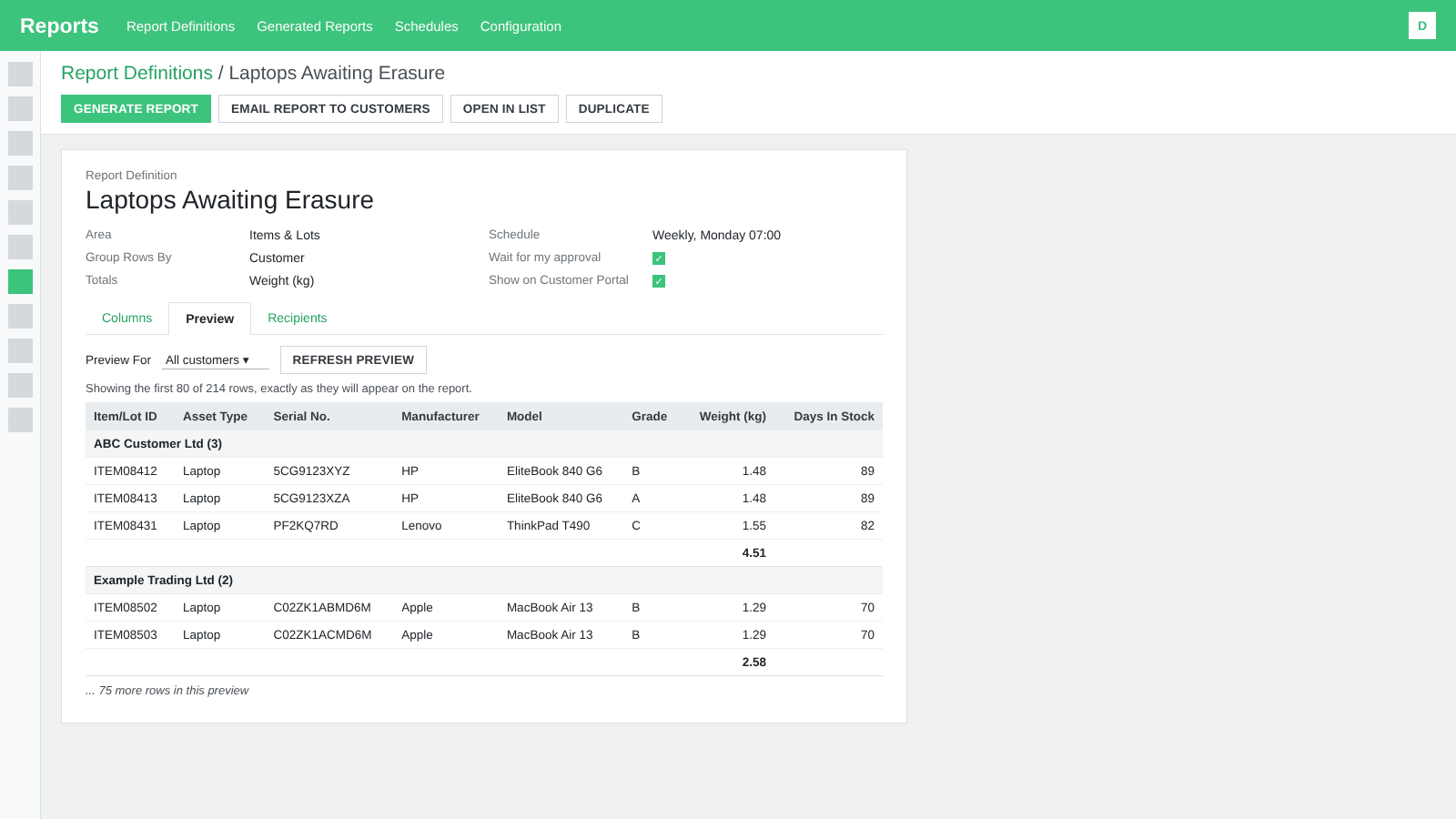
- Customers get only their own rows, unless you choose otherwise
- Reports on the Customer Portal, as a spreadsheet or PDF
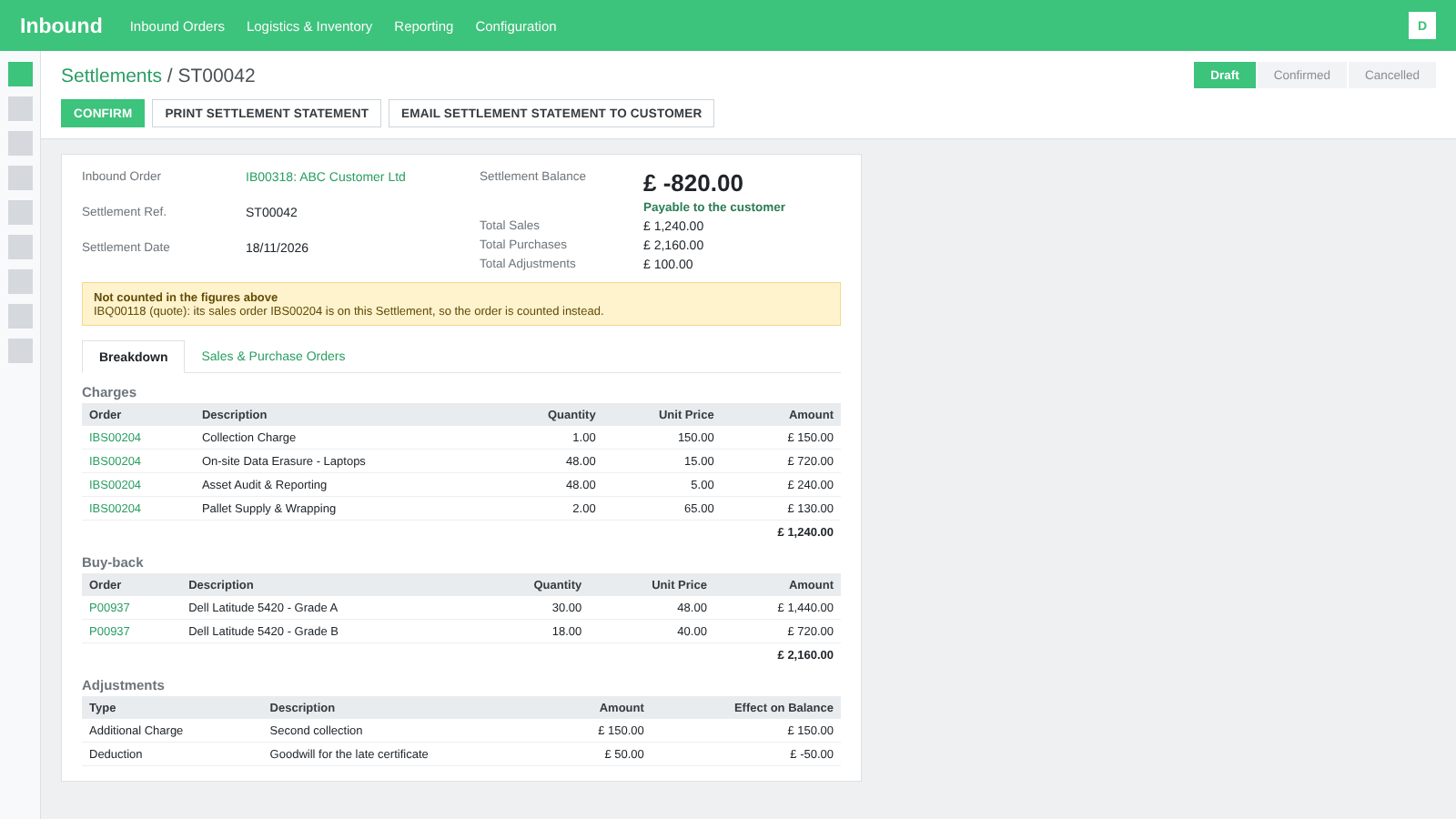
- Each order counted once, with a Not counted box
- Units received, graded, settled and written off
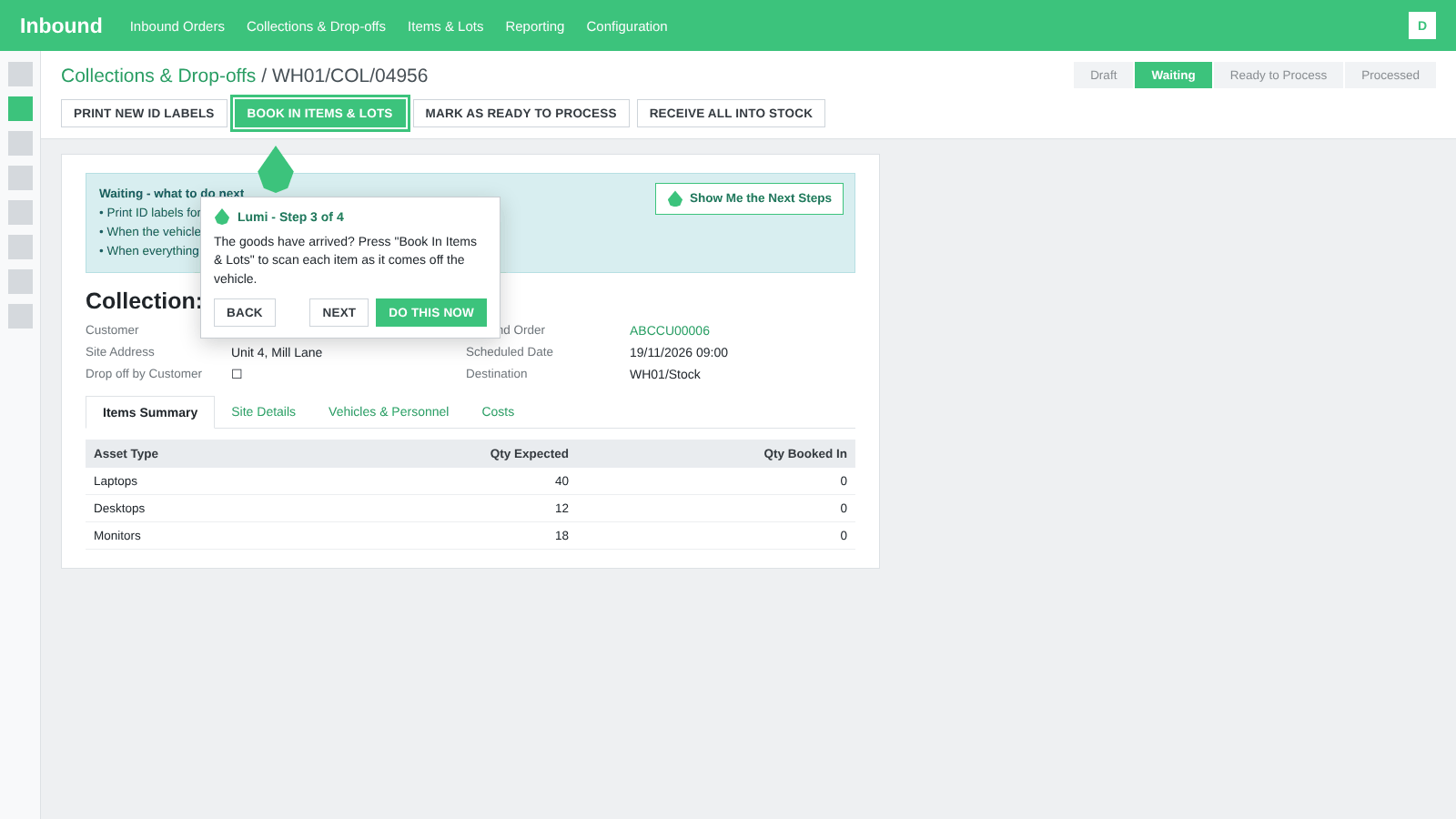
- Guides carry on across screens and pop-ups
- Book a Collection and Receive It, start to finish
RecyclyERP 2026.20 brings you your own reports: a new Reports app that turns the lists you already use, from Items & Lots and Inbound Orders to Settlements and Returns, into reports you can generate, email to your customers, put on their Customer Portal or send on a schedule, and includes 16 new built-in reports to get you started.
Alongside it, Settlements show every charge, buy-back line and adjustment and print as a Settlement Statement. Lumi, the in-app guide, points at the next thing to click - it's only available for a few parts of RecyclyERP at the moment but we'll build on it over time, making it even EASIER to get started and train new staff.
New ITAD documents arrive: a Chain of Custody Report, a Goods Received Note and a Mass Balance Report.
Booking forms gain minimums, ship-in kits and automatic confirmation for chosen customers, and Item Specifications now fill in CPUs, RAM and drives for you, with Phonecheck joining your hardware audit sources.
This release focuses on the Report Builder, Settlements & Purchasing, Lumi, ITAD Reports & Documents, Online Collection Requests & the Booking Form, Inbound Orders, Collections & Booking In, Items & Lots and Item Specifications, Hardware Auditing, Driver Hub & Fleet, Document Templates, the Customer Portal, the Setup Assistant and the Knowledgebase - with new features added to your Setup Assistant so you don't miss them.
Release Highlights
- Report Builder: A new Reports app turns eight of the lists you already use into reports. Choose Reports > Save as new Report, then generate it as a spreadsheet or a PDF, email it to one customer or many (each customer gets only their own rows unless you choose to send all rows, as the Stock List for Buyers does), show it on their Customer Portal, or send it every day, week, month or quarter, with ready-made reports to start from, six of them for ITAD.
- Settlements, line by line: A Settlement now lists every charge, buy-back line and adjustment, counts each order once and says why anything was left out, freezes its figures when confirmed, and prints or emails as a Settlement Statement showing the units received, graded, settled and written off for each Asset Type.
- Lumi, your in-app guide: The assistant is now called Lumi. Press Show Me the Next Steps on a help panel and Lumi points at the next thing to click on Inbound Orders and collections, carries on across screens and pop-ups, and takes you through booking a collection and receiving it from start to finish.
- New ITAD reports and documents: A Chain of Custody Report for every Inbound Order, a Goods Received Note your customer can sign, a Mass Balance Report of weight in against weight out with a full Weight History behind it, and an Inbound Order Profitability report showing services, resale, buy-in, costs, profit and margin for every order.
- Booking forms that do more: Booking Form Minimums by item count or weight, ship-in kits with boxes and prepaid labels, automatic confirmation for chosen customers, a Book a Collection form you can embed on your own website, and the campaign that brought each booking recorded on the Lead.
- Item Specifications and Phonecheck: An Item Specification now fills in an item's CPUs, RAM and drives, fills an item's blank values when a hardware audit report is matched to it or it is booked in on Booking In - Touch Screen, and can be created from one item or many, while Phonecheck joins your hardware audit sources, matching devices by Item ID, serial number or IMEI and recording battery health.
And that is just the start. Read on for everything in 2026.20.
Report Builder
RecyclyERP now has a Reports app. There is no separate report designer to learn: a report is made from a list you already use, and it always shows today's data.
- Save as new Report: set the filters and columns you want on any of the eight lists below, choose Reports > Save as new Report from the Saved Searches / Reports / Dashboards menu, and the report is kept as a Report Definition with its rows, its columns and a preview, ready to share with your colleagues.
- Eight areas to report on: Items & Lots, Inbound Orders, Collections & Drop-offs, Sales Orders, Settlements, Hardware Audit Reports, Returns and Collection Requests, each with a ready-made report. Built-in reports are locked, so Duplicate one to make it your own.
- Sixteen ready-made ITAD reports:
- Core reports: Data Sanitisation Exceptions, Asset Disposition Register, Asset Disposition Summary, Grading Summary, Processing Backlog and Items in Stock, Oldest First, with new "More than N days ago" periods, a Processing Stage on every item and a Certificate Available column.
- Additional reports: Collection Requests in a Period, Collections and Drop-offs in a Period, Completed Jobs in a Period, Hardware Audit Reports in a Period, Items Received in a Period, Items in Stock by Customer, Returns in a Period, Sales Orders in a Period, Settlements in a Period, Stock List for Buyers
- Generate Report makes a spreadsheet with totals, for one customer or a set of dates. Up to 2,000 rows are made straight away and bigger reports are made in the background, with every run kept under Generated Reports and a setting for how long the files are kept.
- PDF reports are laid out with a Document Template you can edit, logo and all, with versions of your changes, and a PDF is offered wherever a spreadsheet is, for reports that fit the page: Generate Report, email and the Customer Portal.
- Email a report to one customer, or to many at once from its Recipients tab. Each customer gets only their own rows unless you choose to send all rows, money columns are left out unless you allow them, and an Email Run records what happened for each customer.
- Schedules send a report by themselves every day, week, month or quarter, and wait for your approval before anything goes unless you tell them otherwise, with a To Do and a notification when a run is ready.
- Reports on the Customer Portal: switch it on in Settings, allow it for each customer and tick Show on Customer Portal on a report, and your customers get a Reports card where they can see each report on screen and download it.
- Stock List for Buyers: a ready-made report that combines matching rows and sends trade buyers what you have for sale, with quantities and prices and nothing about where it came from.
- Six new Knowledgebase guides cover building, generating, emailing, scheduling and sharing reports, starting with Reports: how they work, and building your own, and they are linked from the help panels, Settings and the Setup Assistant.
Settlements & Purchasing
- A Settlement's new Breakdown tab lists the charges, buy-back and adjustments line by line and counts each order once, a Not counted box says why any order was left out, an adjustment that does not add up is flagged as you type it, and the Settlements list gains a Payable column. Existing Settlements are recalculated on upgrade, with a note on any whose figures changed.
- Confirm now freezes a Settlement's figures, there is a new Cancelled status, a Settlement shows when its orders have changed since, and each order shows its Settlement. On the Inbound Order, the Settlement banner now shows only when the job has both a quote or sales order and an Asset Purchase Order, with a New Draft Settlement button right under it.
- Settlement Statement: a printable Document Template, headed "DRAFT - NOT YET AGREED" until the Settlement is confirmed, with Print Settlement Statement and Email Settlement Statement to Customer buttons, showing the units received, graded, settled and written off for each Asset Type.
- Write-Off Reasons: a new list of reasons. Write Off Items From Stock on a collection now asks for one, and it goes in each item's Log Note and on the Settlement Statement.
- An Asset Purchase Order can now pay each item at its locked-in Customer Payout as well as its Purchase Price, from Items & Lots or the job's New Asset Purchase Order, with a Paid At column on its lines and a warning in Recalculate Customer Payout when the item is already on an order.
- An Asset Purchase Order paying a customer for their own job confirms straight away with no unnecessary pop-up, and Create Bill bills the quantities on the order.
- Your company's own tax name, such as GST, replaces "VAT" on Purchase Orders, Settings and the Settlement order lists.
- Enhancements to printed purchase orders and invoices: heading lines no longer show 0.00 figures, zero-quantity lines are left off, a name is no longer printed twice above its address, the Purchase Order Date shows on a draft, and grades read "(Grade A)".
Lumi, the in-app guide
- The assistant is now called Lumi, with a new picture.
- Show Me the Next Steps: a button on the help panels of Inbound Orders and collections that makes Lumi point at the next thing to click, and do the step for you when you ask it to.
- Guides carry on across screens and into pop-ups, with a trail of the steps so far, an All done card at the end, and a strip across the bottom of the screen on a phone.
- The first complete guide, Book a Collection and Receive It, takes you from booking to stock, drop-offs included, on all three Booking In screens.
- Lumi has its own chat in Communications, with a welcome message and guides by topic.
- A new Knowledgebase guide, Lumi: being shown the next steps, explains it.
ITAD Reports & Documents
- Chain of Custody Report: a dated record of every item on an Inbound Order from collection to final outcome, as a Document Template. Drives record who did the work, where it was done and who witnessed it, there is a Record Data Destruction pop-up, and erasure times and technicians are read from Blancco, Certus, YouWipe and Phonecheck reports.
- Goods Received Note: expected against received for each Asset Type, with missing and unexpected serial numbers and a customer signature, printed as a Document Template or sent with Email Goods Received Note to Customer from the collection.
- Weight History records every change to the weight of your stock: items carry a Weight in Stock, breakdowns are taken into account, deliveries record the Weight Shipped, and the history is under Logistics & Inventory > Reporting > Weight History.
- Mass Balance Report: weight in against weight out by Asset Type, for a date range or a single job, printed as a Document Template.
- Inbound Order Profitability: a new report under Inbound > Reporting with one row per order showing services, resale, buy-in, costs, profit and margin, by customer and by month, with money in another currency converted into your company's currency before it is added up.
- Inbound Orders now record the date they were completed, filled in for orders already completed.
Online Collection Requests & the Booking Form
- Booking Form Minimums: set a minimum by item count or weight, and choose whether a booking below it gets a warning, is refused with other ways of booking suggested, or carries a charge, with an exemption tick for chosen customers and a Below Minimum notice on the order.
- Ship-in kits: customers can ask for boxes and prepaid labels on the booking form, controlled by a Send it to us setting with maximums and costs, and each request gains a Ship-in Kit tab.
- Requests from chosen customers can be confirmed automatically, up to a set number per customer per day, while some requests always wait for a person.
- Declining a request uses a pop-up with ready-made Decline Reasons.
- Embed the Book a Collection form on any website you allow, such as a WordPress site, with the thank-you message shown inside the form and the same spam protection as your own booking page.
- Marketing attribution: Leads and Inbound Orders record the campaign (UTM) details, Google click ID, landing page and an External Reference from the booking form, carried through when a Lead is converted, Lead Sources and Mediums fill themselves in from those campaign details, and Leads gain a Marketing tab.
- Also See buttons link the Availability and Closed Dates lists.
Inbound Orders, Collections & Booking In
- Completing an Inbound Order now offers to complete its items' processing too (big jobs run in the background with a progress bar, and the offer can be switched off in Settings), and the Environmental Impact Report shows how many items it will count and is never produced empty.
- Asset Sub-types on expected items: a job's expected items, its collections, Booking In, the booking form and the paperwork all carry the Sub-type, Booking In matches items by it, and the Expected Items and Booking In standard screens show both Asset Type and Sub-type.
- The Inbound Orders list shows Expected Items and Items Received as separate columns.
- When Inbound Order references use the Customer Code, Next Collection Number on each customer sets that customer's next number, with a check against duplicates.
- Enhancements to Inbound Order approvals: the order says who must approve it and why, approval is given from an Approve Inbound Order window, an order needing several Approval Groups waits for all of them, and moving an order back withdraws its approval.
- Core stages and system locations are protected from deletion, Restore Standard Stages puts them back, and there is always a Completed and a Cancelled stage.
- Effective Date is renamed Completed Date on collections, drop-offs, deliveries and receipts, with a Completed Date column on the Collections & Drop-offs list and an optional one on the Inbound Order's Collections / Drop-offs tab.
- Bins: move a collection's items into bins in one go with Move Items into Bins, choose the bin at Booking In, and give each Asset Type a Default Bin, with putaway rules to set up. The new guide Moving Stock into Bins explains it.
- Booking In marks an Asset Type nobody expected as Not Expected and no longer raises the quantity expected, and a second weight column shows the other unit.
- Administrators can add a new Asset Type without leaving Booking In. Services and consumables are no longer listed as Asset Types at Booking In, in Driver Hub, in Expected Items or on the booking form, and Grid Entry names any missing column.
- The Services pop-up uses a single-choice drop-down where only one option is allowed, and the Attention Required banner names the services and takes you to the Services tab.
- Set which Asset Types to load here briefly highlights the column to fill in.
- Changing a received item's Asset Type changes only that item, not its whole row on the collection.
- Every import screen offers a blank template to download, and imported collections go to that screen's warehouse.
- Choose which Document Template the Hazardous Waste Consignment Note prints for each UK nation, with an override on each collection, explained in the new guide Choosing your own Hazardous Waste Consignment Note templates.
- Changing an item's Arrives as Waste now goes through one Change pop-up that asks for a reason and a confirmation that it reflects what the customer handed over, and every change on an item or a Contract is recorded.
Items & Lots and Item Specifications
- An Item Specification now copies its CPUs, RAM and drives onto the item, values fill in as soon as a specification is chosen, and specifications are named with their Manufacturer.
- Hardware audit reports and Booking In - Touch Screen fill blank values from the matching Item Specification, and never overwrite what is already there.
- Create an Item Specification from one item or from many at once, or fill the blanks of an existing one.
- Every attribute has a tooltip, attribute headings collapse and expand with Expand All and Collapse All, remembered for each user, and the Item Specification screens work on a phone and a tablet.
- The item form shows where the item is, with plain notices, and Items & Lots can be grouped by Package.
- One click takes you from any lot back to its Inbound Order, and items show what they were broken down from and into, with a Broken Down ribbon.
- A breakdown that gives back only the same Asset Type is refused, and you are warned when more comes out than went in.
- A Supplier Taxes column on Asset Types, Consumables and Services, editable in bulk, and plain wording for Can be Purchased and Can be Sold, with a check before either is unticked.
- Enhancements to Items & Lots: the side panel refreshes when you come back to the list and its totals are rounded, the Sub-type box offers only its Asset Type's Sub-types, an item saves without asking for attributes it does not need, spec labels shrink long values to fit and warn when they cannot, Location Type saves from the location's own screen, and the Profitability section spans the whole Financials tab.
Hardware Auditing
- Phonecheck is a new hardware audit source: devices are downloaded every hour and matched by Item ID, serial number or IMEI, each with a snapshot that includes battery health, and items gain IMEI, ESN Status and Device Lock Status.
- Update Attributes from matching Audit Reports opens straight away for many items, shows a progress bar with a Stop button, skips any item it cannot update and ends with a summary saying why.
- Certus loose-drive reports now download, match and process as loose drives.
- An item keeps its Hardware Audit Reports list whatever values are saved on it.
Driver Hub & Fleet
- Choose which vehicles each driver can use (All Vehicles or Selected Vehicles), and Select Vehicle lists free vehicles first, asking "Are you sure?" before a booked one is chosen.
- A driver can tick several items at once with Add one or more item(s), with a filter to find them.
- Driver Hub records Asset Sub-types and unidentified items when a driver counts a collection.
- Ready-made notes now cover items nobody expected, and a note can be kept to particular units, such as weights.
- Pop-ups with a typing box stay above the phone's keyboard.
- A Driver Hub tab on the User form, a Driver Hub Status column on the Employees and Users lists, and a new Fleet > Drivers menu.
Document Templates
- The standard Document Templates print your own logo and address. Templates you have not edited are updated automatically and keep the old file as a version.
- The Documents menu gains a filter box, a remembered sort, a Recently used section and file-type icons.
- Document Template versions show which have a file attached, and changes to a template's file are logged.
- The Document Templates list's search, filters and Group By are rebuilt, and the System Area picker is sorted A to Z with friendly names.
Customer Portal
- Document downloads on the Customer Portal can be controlled for each customer and each job.
Setup Assistant & Users
- Setup Assistant: step-by-step set-up for Grading and Fair Market Value (FMV): The Setup Assistant now walks you through grading and Fair Market Value (FMV) step by step, in two new areas, Asset Grading and Asset Valuation (FMV). Existing systems will see up to seven new Setup Actions as To Do. If you do not grade items, or do not value them, answer No for that area on Guided Setup's first page (Change Which Features You Use) and its actions are marked Not Needed in one go. Two new guides explain both features.
- Setup Assistant search matches every word you type, area headings show counts such as "(5 showing, 0 of 13 done)", and the column to fill in is highlighted when a list opens from the Setup Assistant or Settings.
- Clearer Default Access Rights wording with a new Setup Action, and new users take their language, date format and time zone from the Default User Template.
- A new Invited status for users who have been invited.
- Enhancements to Set or Change Password, on an iPhone and when changing several users at once.
Knowledgebase
- Eleven new guides: six for Reports (Reports: how they work, and building your own, Reports: generating a spreadsheet or PDF, Reports: emailing a report to one customer or many, Reports: schedules that send a report by themselves, Reports: sharing reports on the Customer Portal and Reports: sending trade buyers a list of your stock), Grading: Item Grades, Grading Schemes, Templates and Rules, Fair Market Value (FMV): price lists, grade effects and customer payouts, Lumi: being shown the next steps, Moving Stock into Bins and Choosing your own Hazardous Waste Consignment Note templates.
General & Platform-wide Improvements
- Keyboard shortcuts in the menu search: Searching the menus is now quicker with the keyboard. Type in Search menus... at the top of the main menu, then use the up and down arrows (or Tab and Shift+Tab) to move through the results and press Enter to open one; pressing Enter straight away opens the top result. On a computer with a mouse or trackpad, a short tip under the search box reminds you how.
- Menu search results show each screen's name in bold over its menu route, a screen reached from several menus shows once with every route, Document Templates and Report Definitions can be found by name, and app names read clearly on any background.
- Pin up to three columns to the left of any full-screen list, so they stay in view as you scroll sideways.
- Side panels can be resized and collapsed and remember how you left them, and columns flash green when shown and red when hidden.
- Fit more on screen: full column headings over two lines with tooltips, slimmer side gaps on forms and a slimmer message panel.
- Filters and Group By sit above the row count when the bar wraps, the help panel stays put when a screen scrolls sideways, a drop-down opened with a click stays open, and phone forms stay inside the screen.
- Increase and Decrease indent buttons in the text editor, and a full-width Log note panel that can be collapsed.
- A list that refreshes itself now switches this off on lists of more than 100 records and says why.
- The RecyclyERP Update notice is redesigned: it can be postponed twice and dragged out of the way, shows a Please wait screen while the update finishes, and works across tabs. When RecyclyERP has been updated while you were working, the message says so and offers a Reload button.
- RecyclyERP's own name now appears on every pop-up and message, including server errors, an expired session and the browser's notification request, and a RecyclyERP offline page shows when the system cannot be reached.
- Search engines: your website and shop can be found, your system stays private: Google and other search engines can list your public website pages, your shop and your booking page, but never your login, back office or Customer Portal. Demo, test and trial systems are hidden completely. If your system was hidden from search engines before, it stays hidden until an administrator unticks "Hide this whole system from search engines" under Settings > Website.
- Invoicing lists gain the standard New, Basic Export and Import buttons, with Credit Notes and Refunds back in the Invoicing menu.
- The Declined, Lost or Cancelled reason pop-up has a wider box and a Details label, and the website builder's New menu offers just Page and Blog Post.
- A new order for the apps, a tooltip on every app, and Setup Assistant / Guided Setup as the Setup Assistant app's name.
- Enhancements to the View / Assign pop-up on deliveries: the item box always shows its drop-down arrow and the explanation runs the full width.
The above changes are now available for all customers to use (you might just need to refresh your browser).
Coming soon...
2026.20 is the first release with the Report Builder. Here is a taste of what the team is working on for the coming releases:
- E-Waste Handling, next phase: Gross, tare and net weights at goods-in with a weight ticket, a weight discrepancy receipt the customer signs, and charging and paying by weight.
- ESG, next phases: Materials and social impact tracking, plus a "Your Effect on the Planet" view for eCommerce shoppers.
- Digital Waste Tracking, next phase: Defra intend to replace the spreadsheet upload with a direct connection, and automatic submission is planned before the manual route is withdrawn in 2027 Q4.
- Grading & Valuation, next phase: Automatic valuations flowing straight from your grading results into quotes.
- Online Collection Requests, next phase: Approving or declining many requests at once, with a requests calendar.
- Marketplace eCommerce integrations: List and sell your stock on marketplaces such as Amazon and eBay, directly from RecyclyERP.
- SLA tracking on Inbound Orders: See SLA deadlines on orders, get reminders before a breach, and report on SLA performance.
If you have any queries do not hesitate to contact us, or simply click here to arrange a comprehensive demonstration.
- The Recycly Dev Team