This article covers the money side of a customer return, once the goods are back on the RMA (Return Merchandise Authorisation - the reference a customer quotes when sending items back): the credit note, the restocking fee, refunds and replacement orders. It also covers the surprise: a return whose goods were never invoiced produces no credit note at all, and closes itself the moment the items are booked in.
It picks up where Returns (RMAs): receiving items back and deciding what happens to them (opens in a new tab) stops. Not raised yet? Start at Returns (RMAs): setting up and raising a return (opens in a new tab). The paperwork is in Returns (RMAs): the customer pack, the RMA document and return labels (opens in a new tab), and Returns (RMAs): the Returns report (opens in a new tab) covers every return.
1. Before your first credit note (administrators)
- The restocking fee, if you want one. The global default is Users & Settings > Settings > Sales > Returns > Default Restocking Fee (%), blank out of the box, so nobody is charged until somebody sets it. The number is the percentage itself rather than a fraction, and takes decimals: 15 is 15 per cent, 7.5 is seven and a half.
- The per-customer override. Address Book > open the company > Sales & Purchase tab > Restocking Fee (%), last in the Sales section, directly below Return Window (days) and on company records only. Blank falls back to the global default, and so does 0, so setting a customer to 0 does NOT exempt them.
- The Restocking Fee product. RecyclyERP ships a service product called exactly Restocking Fee and writes every deduction line against it. It carries no income account or tax of its own, so both fall back to your company's own defaults, and a tax set on the product wins. Check where it posts before your first fee-bearing credit note.
- Accounting access. Anybody who can work a return can raise a credit note, warehouse users included, but only accounting access opens, checks and posts it. Without it you get Credit note raised: "The draft credit note has been created. Viewing credit notes needs accounting access, so ask your finance team to check and post it." That is normal.
- Xero and QuickBooks users. Map the Restocking Fee product to a QuickBooks Product/Service and its tax to a QuickBooks tax code. In Xero, the source invoice must already be Approved there and every line needs exactly one tax code. Miss either and the credit note will not post.
2. Type decides everything else
Type is the field the whole money side turns on, and every new return starts as Replacement, so check it. It can still be changed at Draft or Authorised, and locks from Awaiting Receipt onwards. The field's own help, and the help panel on the Returns list, both say "Refund pays the customer back". That is what YOU do with the money: RecyclyERP never touches a card and sends money nowhere. Inside the system Refund and Credit are identical - same button, same draft credit note, same fee - while Replacement produces a draft outbound order instead and no credit note.
What Refund adds is a record of the payment you made yourself, in the right-hand column under the dates: Refund Method, a dropdown offering Bank transfer, Original payment method or Other, and Refund Reference, free text for your own payment reference. Neither can be filled in until the goods are back - earlier gets "Refund details can only be recorded once the items are back."
3. Raising the credit note
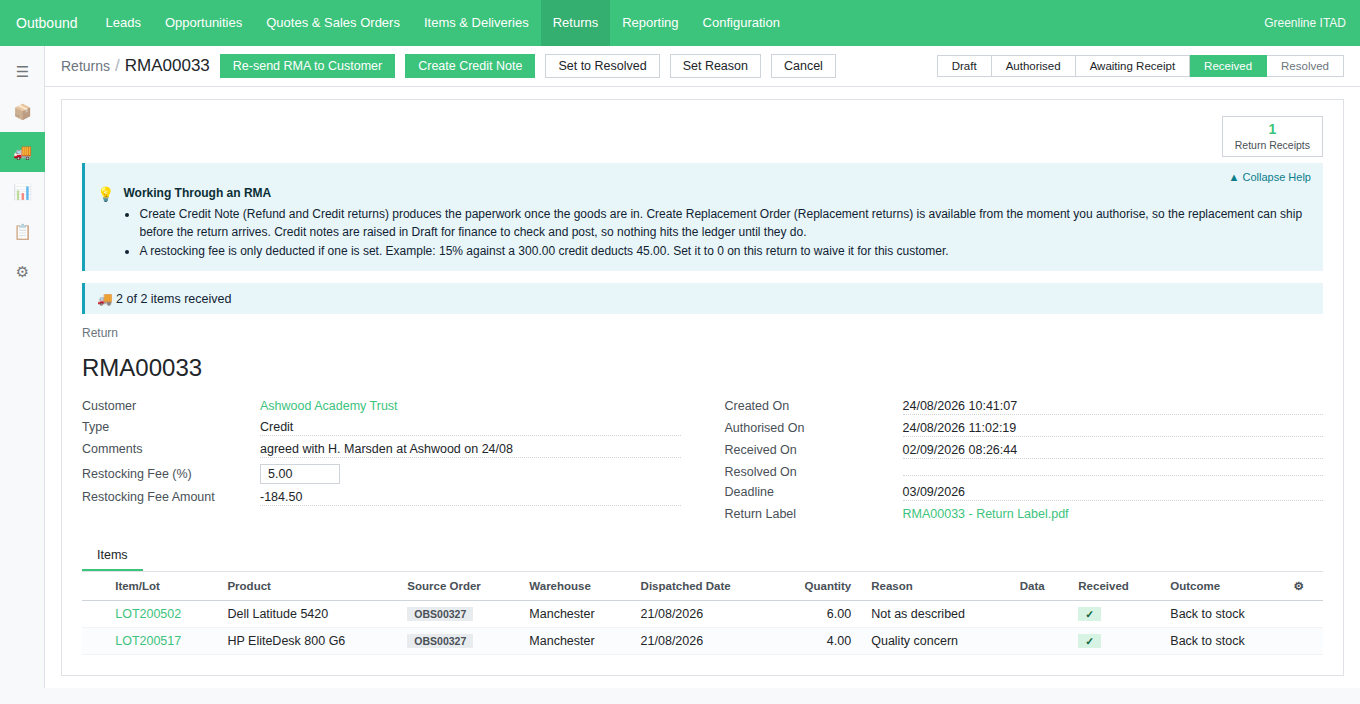
Under Outbound > Returns, open the return, check Type is Refund or Credit, and book the goods in with Receive Items and Confirm Receipt. Once every line is in, the return reaches Received and Create Credit Note appears in the header. Its tooltip says it is available from Received onwards; in practice that is at Received only, because the only statuses after it are Resolved and Cancelled, and the button is gone on both.
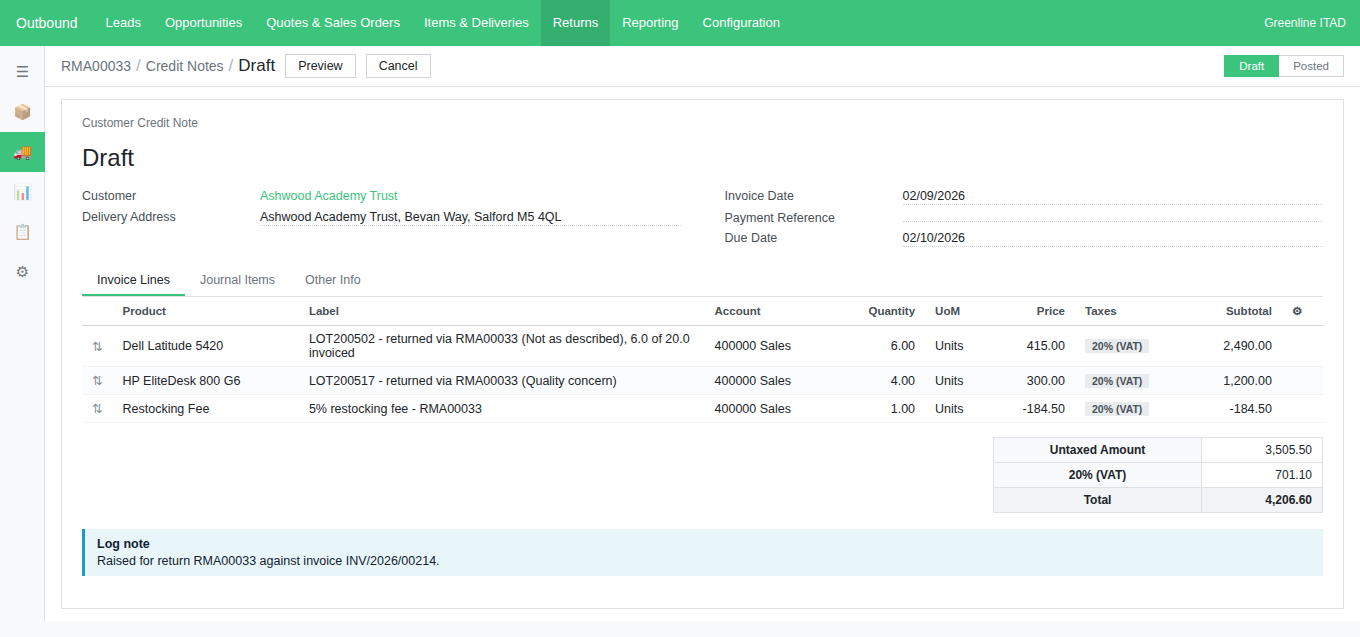
Pressing it produces one draft credit note per source invoice, so nothing reaches the ledger until finance posts them. Each credit line names the item, the return and the reason, and says so when it takes only part of what an invoice billed: "LOT200502 - returned via RMA00033 (Not as described), 6.0 of 20.0 invoiced", with ", 5% discount applied" on the end where the invoice line carried one - the price credited is always what the customer was actually billed, net of it.
The same item is never credited twice. RecyclyERP records which invoice line each credit line came off, so a later return against the same order walks back to an earlier invoice for whatever is left; cancelling a note releases its quantities again. The log records it, in the note's own currency: "1 draft credit note(s) created by Sam Whitfield for 2 item(s): £ 4,206.60 against INV/2026/00214. Includes a 5% restocking fee of £ 184.50."
4. The restocking fee
The fee is always a percentage, never a fixed amount, and it must be between 0 and 100: "A restocking fee must be between 0 and 100 per cent." Whatever ends up on the return is what gets charged. The worked example: RMA00033 is a Credit return from Ashwood Academy Trust, at Received. It credits two lines worth 3,690.00 before VAT (Value Added Tax) with the fee set to 5, so a line reading "5% restocking fee - RMA00033" is added at -184.50 and the note's Untaxed Amount is 3,505.50. Restocking Fee Amount on the return reads -184.50 without opening the note. The fee is always worked out on the value BEFORE tax, it carries tax through the customer's tax scheme like any other line, and two notes get a fee line each on their own subtotals.
- To waive it on one return, set Restocking Fee (%) to 0 before pressing Create Credit Note. No deduction line is added at all, rather than one of zero.
- The field locks once a credit note exists: "The restocking fee cannot be changed once a credit note exists. Cancel the credit note first if the fee was wrong." Cancel it, correct the percentage, and press again.
- The fee is a line of its own, against the Restocking Fee product rather than the returned goods, so it lowers what the credit note pays out without changing the value recorded against the goods - which is what the Credited column of the Returns report (opens in a new tab) shows.
- Ignore the fee fields on a Replacement return. They show a figure, and the percentage even locks once a replacement order exists, but a replacement raises no credit note, so nothing is charged.
5. When there is no credit note to raise
If none of the returned items had ever been invoiced there is nothing to credit, so no note is raised, no button appears, and the return goes straight from receiving to Resolved. That is correct behaviour, not a fault.
You are told three times, in the return's own words: a message headed Return closed as you press Confirm Receipt, a line in the log, and a panel headed Why this return is already Resolved at the top of the form, above the reference and the details, still there weeks later. All three read: "Everything on this return reached Received and was booked into stock. None of these items had ever been invoiced, so there is nothing to credit - taking them off the quantity still to be billed IS the outcome, and that is already done. That is why the return went straight on to Resolved and offers no Create Credit Note button." Section 7's other closing routes get their own wording in the same places.
A return can hold a mix: the invoiced items produce a credit note, the uninvoiced ones come off the quantity still to be billed, and nothing is counted twice. Press Create Credit Note where only uninvoiced items are left and No credit note needed confirms it: "None of the returned items had been invoiced, so there is nothing to credit. 4 item(s) have been taken off the quantity still to be billed instead. See the log for details."
6. Replacement orders
Outbound > Returns > open the return > set Type to Replacement > add the items and give each one a reason > Authorise > Create Replacement Order. It is there from Authorised, so the replacement can ship before the goods come back, and it disappears once a live replacement order exists - pressing it twice gets "This return already has a replacement order."
What it creates is a draft outbound order for the same customer, one line per item, each priced at 0.00 and named after what it replaces: "Dell Latitude 5420 - replacement for LOT200502 (RMA00033)". Where the original sale line carried a SKU (Stock Keeping Unit - the code identifying a sellable product variant) the replacement carries the same one, so it draws on the same pool of stock - but never a specific item, because the one being replaced is still with the customer. Type a price in before confirming if it is chargeable; otherwise ship it as usual.
The original order still gets billed. A replacement does not reduce what the customer owes - they are keeping goods to the same value. If you meant to credit them, the return should have been Refund or Credit.
7. When a return closes itself, and forcing it
You do not normally move a return to Resolved by hand: it closes itself once its outcome is complete, writing why into its log and onto the form. Every route needs every item back and booked in first; after that the closing event depends on the type:
- Refund or Credit: when every credit note raised against it has been posted by finance. A cancelled note does not hold it up, and a return whose notes were ALL cancelled with nothing left to credit closes itself too.
- Refund or Credit with nothing invoiced: the moment the last item is booked in, as covered in section 5.
- Replacement: when every item is back AND the replacement order's delivery has been processed. Both, not either.
Set to Resolved is the administrator-only button for the returns none of those routes reaches: an item that is never turning up, leaving the return at Awaiting Receipt for good, or a replacement order cancelled and settled another way. It shows at Awaiting Receipt and Received, and logs who forced it and the state of the credit notes and replacement order at that moment.
Common problems
- "The Create Credit Note button is not there." Either the return is a Replacement, which is what Type says unless somebody changed it (you can still change it at Draft or Authorised); or it has not reached Received, so goods are still to book in; or a live credit note exists - open it with the Credit Notes smart button, cancel it if it is wrong, and the button comes back.
- "There is nothing left to credit on this return, and nothing left to take off the quantity still to be billed." Everything on this return has already been dealt with. Open the Credit Notes smart button to see the note that covers it.
- "The Restocking Fee product is missing. Ask an administrator to upgrade RecyclyERP, or set the fee to 0 on this return." The shipped product has been deleted or the module has not been upgraded, both an administrator's job. Setting the fee to 0 gets the credit note out meanwhile.