Recycly's stock system works very much like an accounts system - once you've marked a "transaction" as complete, it cannot be changed.
However, mistakes can happen, so Recycly does offer ways to adjust quantities of received items.
Adjusting the quantity of a received Lot
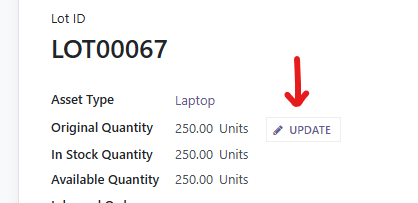
To adjust the quantity of a received Lot, simply open the Lot record, and click the "Update" button next to the Original Quantity field
And enter the correct quantity
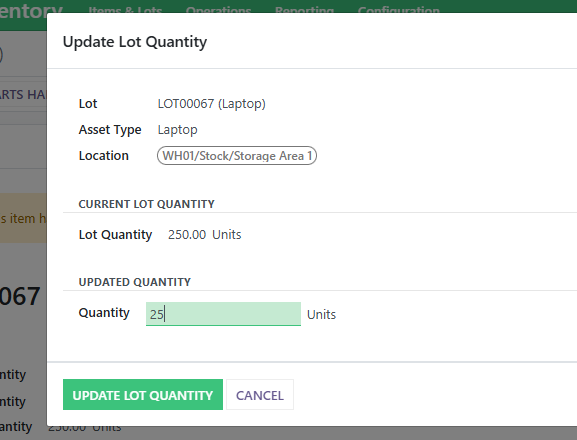
In the background, Recycly then calculated the "Inventory Adjustment" that is needed and corrects the quantity for you
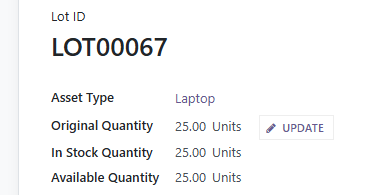
This transaction can be seen in the Moves History on the Lot

Please note that Recycly does not update the Quantity Scanned on the collection / Drop-off, however all of Recycly's reports are based on the Current stock levels of items/lots rather than the quantity scanned figures.
Something turned up after the collection was processed
If an item or lot turns up after its collection or drop-off reads "Processed", open the collection and press Add Items to this Collection & Receive. It books the item in and receives it straight away on that collection, which stays "Processed" and keeps its Date/Time Received. From the Inbound Order, Book In Items to a Collection does the same.
If waste tracking for that day has already been sent to Defra (the Department for Environment, Food and Rural Affairs), you are warned first. Nothing is blocked, but that day's figures change and need sending to Defra again, and a note on the day says so.
A collection marked "Processed" with nothing ever received can be reopened instead: Reopen Closed Collection (or Reopen Closed Drop-off) puts it back to "Waiting". See Inbound Orders: how a job runs from booking to completion (opens in a new tab).